

AI-powered lead scoring can save your sales team time, eliminate guesswork, and improve conversion rates. Instead of relying on outdated manual methods or static point systems, AI analyzes thousands of data points to predict which leads are most likely to convert. The result? Faster lead qualification, reduced sales cycle times, and higher productivity.
Key Takeaways:
- Manual lead scoring wastes time: Sales teams spend 67% of their time chasing low-quality leads, leaving only 28% for actual selling.
- AI improves efficiency: AI can process 10x more leads, cut response times by 31%, and achieve up to 98.39% accuracy in predicting conversions.
- Proven results: Companies report up to a 79% increase in conversion rates and a 25% boost in productivity after adopting AI lead scoring.
- Steps to implement AI scoring:
- Review your current lead scoring process and clean up your data.
- Define your Ideal Customer Profile (ICP) with specific attributes.
- Choose an AI platform that integrates with your CRM and marketing tools.
- Train your AI model using historical data and regularly update it.
- Automate multi-channel outreach based on lead scores.
AI-powered lead scoring eliminates bias, adapts to changing buyer behaviors, and ensures leads are engaged when their interest is highest. This streamlined process helps your team focus on closing deals instead of chasing unqualified leads.
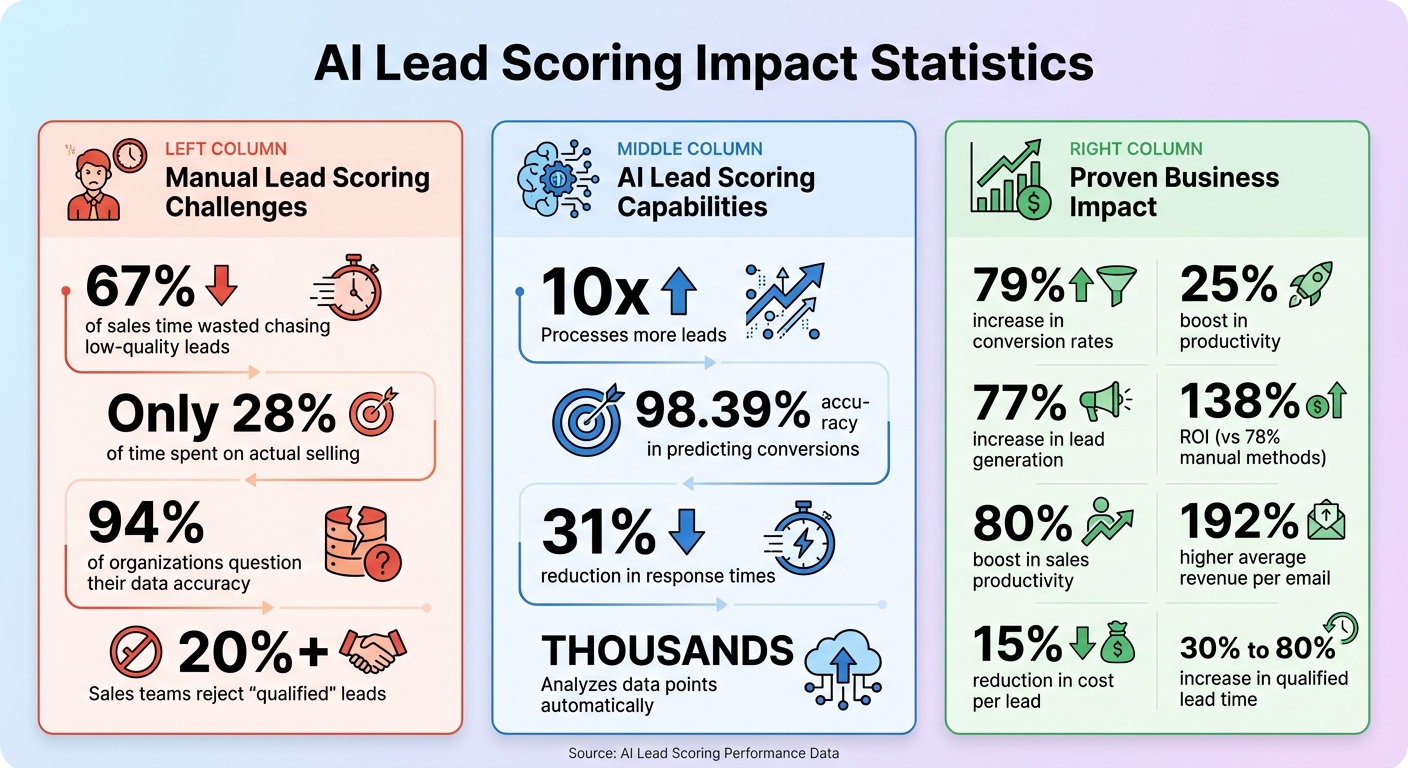
AI Lead Scoring Statistics: Impact on Sales Performance and ROI
Step 1: Review Your Current Lead Scoring Process
Before diving into AI automation, take a hard look at your current lead scoring system. Analyzing your pipeline data can reveal gaps and ensure your foundation is solid. Without this step, even the most advanced AI won’t deliver accurate results.
The cornerstone of any scoring system is data quality, and the stats are alarming: 94% of organizations question the accuracy of their customer and prospect data. If your CRM is cluttered with duplicate entries, inconsistent labels (like "Web" vs. "website"), or incomplete contact details, your scoring system is on shaky ground. Start by cleaning up your database – eliminating duplicates, standardizing labels, and filling in missing fields.
Next, evaluate whether your scoring system is actually predicting conversions. Compare your last 50 closed-won deals to the criteria you’re using now. If high-scoring leads close just as slowly as low-scoring ones – or worse, if sales teams are rejecting more than 20% of your "qualified" leads – your scoring logic may no longer reflect reality. This "scoring drift" happens when lead behavior evolves, but your system doesn’t keep up.
"The real risk in AI lead scoring CRM isn’t a bad model. It’s an unmanaged definition of ‘qualified’ that changes faster than your system can adapt." – Rivulet IQ
Metrics to Review
To identify weaknesses and guide improvements, focus on metrics that highlight system flaws. Here’s a breakdown of the key numbers to watch:
| Metric to Review | Purpose | Red Flag |
|---|---|---|
| Data Quality | Ensures clean, usable data | Over 10% duplicate or missing fields |
| Conversion Rate | Tests scoring accuracy | No difference in win rates between high and low scores |
| Speed-to-Lead | Tracks how quickly leads are contacted | High-intent leads waiting over 24 hours for follow-up |
| Sales Cycle Length | Assesses lead readiness | High-scoring leads taking as long to close as cold leads |
| MQL-to-SQL Rate | Measures marketing and sales alignment | Sales rejecting more than 20% of qualified leads |
Start by focusing on conversion correlation. For example, calculate the close rate for specific actions – like visiting your pricing page – and compare it to your overall baseline. If pricing page visitors convert at 6% compared to a 2% average, that behavior is 3x more valuable. If your system assigns arbitrary points (e.g., "+10 for any page visit") without weighting behaviors by their actual impact, you’re missing out on critical insights.
Another key metric is speed-to-lead. AI can cut response times by up to 31%, but first, you need to know how long leads currently wait. If high-intent leads aren’t contacted within 24 hours, their interest may already be fading – no matter how well they score.
Spotting Weaknesses in Manual Scoring
After addressing data and conversion gaps, dig deeper into the flaws of manual scoring. One common issue? Overvaluing low-intent actions. Manual systems often give points for things like email opens or blog views, equating a student downloading a whitepaper with a VP requesting a demo. Review high-scoring leads that didn’t convert to identify these low-value signals.
Also, check for negative scoring. Actions like unsubscribing, visiting your careers page, or using personal email domains should reduce a lead’s score – not just freeze it. Without this, your "qualified" list may include leads who’ve already signaled disinterest.
Finally, look for score decay. If your system doesn’t lower scores for inactivity, it risks keeping outdated leads in the pipeline. Document these weaknesses – they’re exactly where AI can step in to make improvements.
sbb-itb-3bca853
Step 2: Define Your Ideal Customer Profile and Scoring Criteria
After cleaning up your data and identifying weaknesses in your lead scoring, the next step is to clearly define your Ideal Customer Profile (ICP). A well-defined ICP ensures your AI focuses on scoring the right leads.
The impact of this step is huge. Companies that establish 8 or more ICP criteria before setting up AI agents achieve 3x higher positive reply rates than those using only 3 or fewer criteria. Why? AI thrives on clear patterns. If you give it vague instructions, it won’t know the difference between a well-funded SaaS startup ready to buy and a small blog with no budget.
"The difference between an AI agent that generates 2 qualified meetings per month and one that generates 15 comes down to one thing: how well you trained it on your Ideal Customer Profile." – MarkOps AI
To provide your AI with the right data, use a 4-layer ICP framework: Firmographic (who could buy), Technographic (who is equipped to buy), Behavioral (who might be ready), and Intent (who is actively looking). Companies that incorporate all four layers see 3-5x better results compared to those relying solely on firmographics. With this foundation, you can pinpoint the attributes that matter most.
Determining Key Customer Attributes
Start by analyzing your last 50 closed-won deals to identify patterns in four key areas.
- Firmographic attributes: These are the basics – industry, company size, revenue, and location. Use precise SIC or NAICS codes instead of broad terms for cleaner targeting. For instance, if you sell to B2B SaaS companies, focus on NAICS code 511210 (Software Publishers) rather than the entire "Information" sector.
- Technographic attributes: These show whether a company can effectively use your product. What CRM do they use? Do they already have marketing automation tools? Are they using a competitor’s platform? For example, if your product integrates with Salesforce, prioritize companies already using Salesforce over those on HubSpot.
- Behavioral signals: These reveal readiness to buy. Look for companies hiring their first SDR or Sales Manager – this often signals they’re building an outbound sales team and may be open to automation. Funding is another strong signal; funded companies are 2-3x more likely to invest in sales tools within 60 days of their funding round.
- Intent signals: These capture active buying behavior, such as keyword searches, visits to competitor websites, or reviews on platforms like G2 or TrustRadius. Intent data providers like Bombora start at around $25,000/year, while G2 Buyer Intent offers a more affordable range of $5,000–$15,000/year.
Deduct points for disqualifying signals, such as competitor domains, personal email addresses, or visits to your careers page, to avoid wasting resources on leads unlikely to convert. The next step is turning these attributes into actionable scoring inputs.
Connecting Customer Data to Scoring Inputs
This framework helps translate your customer insights into measurable scoring criteria. Separate Fit (demographics, company profile) from Intent (engagement signals) to ensure both alignment and readiness. A lead might have the perfect fit but no intent – or strong intent but poor fit. Your AI needs both to prioritize effectively.
Here’s how to allocate points:
- Demographic fit: 30 points
- Role fit: 20 points
- Behavioral engagement: 35 points
- Sales activity: 15 points
For example, a VP of Sales at a 100-person SaaS company might earn 30 points for demographics and 20 for role fit. If they visit your pricing page (+15) and request a demo (+25), their total score jumps to 90, signaling high priority.
To keep your pipeline fresh, use score decay. Automatically reduce lead scores by 20% after 30 days of inactivity. This ensures your AI focuses on leads with recent, active intent rather than outdated engagement.
Finally, define a clear outcome for your AI to predict. Instead of vague goals like "lead quality", train your model to predict specific CRM milestones, such as "meeting booked" or "opportunity created". This approach makes the scoring actionable and keeps marketing and sales teams aligned.
Step 3: Choose and Set Up an AI Lead Scoring Solution
Once you’ve nailed down your Ideal Customer Profile (ICP) and scoring metrics, it’s time to pick an AI platform that can help you prioritize leads effectively. Sales teams often waste time chasing low-quality leads, so the right platform should help you focus on the ones most likely to convert.
Features to Look for in a Platform
Start by looking for a no-code, user-friendly setup. Your sales and marketing teams need to be able to configure the scoring logic themselves – without needing a data scientist or engineer. Platforms with visual workflow builders make this easier. For example, you should be able to set rules like, “Qualify leads from SaaS companies with 50+ employees,” without diving into complex Boolean logic. This simplicity not only speeds up implementation but also keeps your team flexible.
Another must-have is deep integration with your tech stack. The platform should seamlessly connect to your CRM (like Salesforce or HubSpot), marketing automation tools (such as Marketo or Mailchimp), and data enrichment services (like Clearbit or ZoomInfo). These connections ensure your AI has access to the behavioral and firmographic data it needs to work effectively.
Transparency is key. Look for platforms with features like a "Reason Last Scored" field, which explains why a lead received a specific score. This clarity helps sales reps trust the system. As Rivulet IQ points out:
"When the score is detached from routing, SLAs, and next-step automation, reps ignore it".
The platform should also support multi-dimensional scoring. This means separating "Fit" (e.g., firmographics and demographics) from "Engagement" (behavioral intent). A single composite score doesn’t provide the same depth of insight. Additionally, the platform should handle negative scoring and score decay – subtracting points for poor fits like competitors or students and lowering scores over time if leads remain inactive.
Lastly, the platform needs to be scalable. It should handle large increases in lead volume – up to 10 times more – without requiring extra manual work or additional staff.
Connecting AI with Your Tech Stack
To make the most of your AI solution, you’ll need to integrate it with your CRM and Marketing Automation Platform (MAP). Set up real-time syncing to ensure data updates every few minutes (ideally every 5 minutes). Create custom fields in your CRM to store AI-generated outputs, such as "Fit Score", "Engagement Score", "Composite Score", and a "Score Explanation" text field.
Use these scores to trigger specific CRM actions. For instance, leads scoring 80+ points could automatically route to a sales rep with a one-hour response SLA, while leads scoring between 50-79 points might enter a nurture sequence. Timing is everything – companies that reach out to leads within 5 minutes of an MQL trigger are 100x more effective than those that wait 30 minutes.
To ensure consistency, standardize your data. Normalize fields like industry, company size, and job titles so AI rules work as intended. Before going live, run a backfill test by applying the AI model to historical leads from the past 60-90 days. This step helps confirm that high scores align with actual conversions and catches any setup errors early.
Training the AI Model with Past Data
Your historical data is the backbone of your AI model. Start by gathering data from your CRM, marketing automation tools, and web analytics. Include demographic, firmographic, and behavioral data. Clean this data by removing duplicates and inconsistencies. Then, transform raw metrics (like "time on site") into actionable scores.
Next, define your training parameters. Choose a historical timeframe – usually three months to two years – and identify the states that qualify leads as "Qualified" or "Disqualified". Most platforms need at least 40 qualified and 40 disqualified leads closed within this timeframe to build an effective model. Feed the AI with records of both successful and unsuccessful deals so it can learn what factors lead to conversions.
Validate the model by splitting your data into training and test sets. Use metrics like the Area Under Curve (AUC) score to measure its accuracy. Once the model is ready, set score ranges (e.g., 0-100) and thresholds for specific actions, like immediate outreach for leads scoring above 85.
To keep the model effective, schedule regular retraining. Update it with new data every 15 days, monthly, or quarterly to avoid "model drift" and stay aligned with evolving buyer behaviors. Businesses using AI lead scoring have reported a 77% increase in lead generation and a 79% boost in conversions. However, these results depend on keeping the model up to date with fresh data.
Step 4: Launch, Track, and Improve Your AI Lead Scoring System
Now that your AI model is ready, it’s time to put it to work. Start with a soft launch – deploy the system to a small, controlled group of leads. This lets you test the waters, catch any configuration errors, and fine-tune the system before rolling it out fully. A phased approach like this also helps ease your sales team into the new process, building trust and confidence in the system.
To ensure clarity and maintain control, combine rules-based guardrails with the AI’s scoring capabilities. For instance, you could set a rule to automatically disqualify leads from competitor domains while allowing the AI to rank all other prospects. It’s also critical to define score-based actions. For example:
- Leads scoring 80+ should be sent directly to a sales rep with a one-hour response SLA.
- Leads scoring between 60–79 might go into a nurture sequence with a 24-hour follow-up.
Defining KPIs for Success
With the system live, the next step is to measure its effectiveness using key performance indicators (KPIs). Start by analyzing conversion rates across score ranges to validate that higher scores align with stronger intent. A good benchmark for MQL (Marketing Qualified Lead) acceptance is an 85% agreement rate from sales reps, meaning they trust the AI’s scoring. Keep an eye on false positives – leads with high scores that fail to convert – and aim to keep that rate below 15%.
Other metrics to monitor include:
- Sales cycle length: How quickly leads move through the funnel.
- Lead velocity: The time from lead creation to conversion.
- Revenue impact: Companies using lead scoring often see an 80% boost in sales productivity and 192% higher average revenue per email.
Don’t forget to watch for model drift, which happens when customer behaviors or market conditions change, making your model less accurate. For example, if your AI was trained on pre-pandemic data, it might struggle to predict behavior in today’s digital-first landscape.
Continuous Model Improvement
Once your AI model is up and running, ongoing refinement is essential to keep it performing at its best. Retrain the model regularly – anywhere from every 15 days to quarterly – and apply score decay to prioritize recent engagements. Update the model with fresh sales outcomes, such as SQLs (Sales Qualified Leads), meetings, and deals closed.
Hold monthly retrospectives with your sales and marketing teams to identify scoring misses. This means reviewing cases where high-scoring leads didn’t convert or low-scoring leads turned into key customers. For example, in March 2023, HubSpot improved its AI scoring by analyzing demographic and engagement data, which led to a 30% increase in conversions and a 25% reduction in sales cycle time.
Run A/B tests to validate updates. Split incoming leads into two groups – one using the current scoring model and the other using a new version – and compare their conversion rates. Companies leveraging AI-powered scoring have reported up to a 20% increase in marketing conversions and a 31% drop in customer churn.
As your business evolves, so will buyer behavior. Treat your AI model as a dynamic system. Keep feeding it fresh data, auditing its performance, and refining it based on what you learn from real-world outcomes. This continuous improvement ensures your lead scoring system stays accurate and effective over time.
Step 5: Automate Multi-Channel Outreach with Scored Leads
Now that your AI scoring system is up and running, it’s time to put it to work. The goal? Deliver the right message to the right lead at the right moment. Automation ensures your team focuses on the most promising prospects while avoiding wasted effort on leads that aren’t ready to convert. This approach enables precise outreach, prioritizing high-value opportunities.
Targeting High-Value Leads
To make the most of your lead scores, set up actions that trigger workflows based on specific thresholds. For instance, leads scoring 80 or higher should go directly to a sales rep with a one-hour response SLA. Quick follow-ups matter – a response within five minutes can significantly boost qualification rates. Leads scoring between 50 and 79 can be added to automated nurture campaigns with educational content, while those below 50 can be deprioritized or placed in long-term marketing efforts.
Automated notifications – whether through Slack, email, or CRM tasks – should alert your sales team the moment a lead crosses a priority threshold. This ensures immediate action and helps prevent "Lead Signal Decay", where conversion rates drop if high-intent leads aren’t contacted quickly. Use smart routing to distribute leads based on factors like territory, expertise, or team capacity, ensuring no single rep is overwhelmed. Businesses using lead scoring models report a 77% boost in lead generation and a 79% jump in conversion rates.
Multi-Channel Engagement with Unselfish AI
Unselfish AI can help you take multi-channel outreach to the next level by integrating it seamlessly into your existing automation workflows. To engage scored leads effectively, you’ll need a system that connects with prospects via SMS, email, and voice – channels that encourage the highest response rates. Unselfish AI excels at re-engaging leads through intelligent sequencing, creating a unified conversation rather than a series of disjointed messages. It also uses behavioral signals – like visits to pricing pages or whitepaper downloads – to tailor outreach based on real-time intent.
What sets Unselfish AI apart is its performance-based model: you only pay for tangible results, such as recovered revenue or booked meetings. This makes it especially useful for tasks like database reactivation, cart abandonment recovery, and voice AI campaigns. The platform is quick to set up – just a few days – and integrates smoothly with your existing tech stack. By automating outreach to high-scoring leads, you can cut speed-to-lead times by up to 31%. Pairing AI-driven lead scoring with personalized, automated multi-channel engagement creates a complete system for efficient and effective outreach.
Conclusion
AI-powered lead scoring completely reshapes how you manage leads, enhancing collaboration between sales and marketing teams. By reviewing your current process, defining clear customer profiles, implementing the right AI tools, and fine-tuning the system over time, you can handle 10 times more leads without increasing your team size. This streamlined approach transforms lead management into a faster, smarter, and more efficient process.
The results speak for themselves: businesses using AI for lead scoring experience a 25% boost in conversion rates, a 15% reduction in cost per lead, and an ROI of 138%, compared to just 78% for those sticking with manual methods. AI also accelerates the qualification process, increasing qualified lead time from 30% to 80%. Beyond efficiency, AI ensures you engage with prospects at their peak interest – when they’re most likely to convert. It eliminates the delays and biases of manual scoring by analyzing leads in seconds.
Unselfish AI simplifies this transformation by combining intelligent lead scoring with automated multi-channel outreach. Their performance-based model ensures you only pay for measurable outcomes, like recovered revenue or scheduled meetings, rather than unused software licenses. With seamless integration and a setup process that takes just a few days, the benefits are almost immediate.
The future of lead management isn’t about working harder – it’s about working smarter. AI processes vast amounts of data, identifies patterns that human judgment might miss, and ensures leads are routed to the right person at the right moment. This frees up your team to focus on what they do best: building relationships and closing deals with high-potential prospects.
FAQs
How much historical data do I need for AI lead scoring?
AI lead scoring works best when you have 6–12 months of clean historical data that includes clear conversion outcomes. This timeframe allows the AI model to learn effectively and make reliable predictions about future lead conversions. To ensure accuracy, it’s also recommended to have at least 40 qualified leads with completed outcomes. This provides the model with enough data to train properly and deliver meaningful results.
How do I prevent bad CRM data from hurting my scores?
Maintaining clean and accurate CRM data is crucial to ensuring your lead scores are reliable and actionable. Start by regularly auditing, validating, and updating your CRM to keep the data fresh and accurate. This helps eliminate errors and outdated information that could skew your scoring.
To build a dependable scoring system, define clear criteria that align with your business goals. Automate the calculations to save time and reduce manual errors, and continuously refine your model as you gather insights and feedback.
Lastly, focus on fast follow-ups and prioritize high-intent leads. Acting quickly on these leads ensures your scoring system delivers meaningful results and supports your sales efforts effectively.
What should happen automatically when a lead hits a high score?
When a lead achieves a high score, automated actions should kick in immediately. These actions might include assigning the lead to the most suitable sales representative, initiating outreach efforts, or moving the lead to the next stage in the sales process. This approach helps ensure that top-priority leads receive prompt attention, boosting efficiency and increasing the chances of converting them into customers.